
Call us now :08045477039
 Send Inquiry
 Send Inquiry
Honeywell PID Controller DC1010
MOQ : 1 Piece
Honeywell PID Controller DC1010 Specification
- Power
- 5 VA (max)
- Usage
- Temperature and process control
- Voltage
- 240 Volt (v)
- Display
- Dual 4-digit LED display
- Product Type
- PID Controller
- Material
- Plastic housing
- Design
- Compact DIN 1/16 (48x48 mm)
- Power Source
- Electric
- Accuracy
- 0.5% of full scale
- Illuminant
- LED
- Dimension (L*W*H)
- 48 x 48 x 110 mm
- Weight
- 499 Grams (g)
- Input Types
- Thermocouple, RTD, 4-20mA, 0-5V
- Protection Level
- IP65 (front panel)
- Mounting
- Panel mount
- Control Method
- PID, ON/OFF, Manual
- Operating Temperature Range
- 0 to 50C
- Sampling Time
- 500 ms
- Alarm Outputs
- 2 Relays or SSR
- Setpoint
- Single setpoint
- Panel Cutout Size
- 45 x 45 mm
Honeywell PID Controller DC1010 Trade Information
- Minimum Order Quantity
- 1 Piece
- Payment Terms
- Cash in Advance (CID), Cash Advance (CA)
- Supply Ability
- 100 Pieces Piece Per Week
- Delivery Time
- 1 Days
- Main Domestic Market
- All India
About Honeywell PID Controller DC1010
| Honeywell PID DC1010 Controller |
|
|
| Honeywell PID DC1010 Controller Specification |
|
|
| Honeywell Low cost PID controller |
| Four Different Model DC1010, DC1020, DC1030, DC1040 |
| Available in four different sizes: 1/16 DIN, 1/8 DIN, 3/16 DIN, 1/4 DIN |
| Set point programming |
| Two large 4 digits displays and one 10 LED bargraph display PV, SP and |
| Setpoint Programming |
| Extended Alarm capability |
Versatile Input Compatibility
The DC1010 supports a broad spectrum of input types including thermocouples, RTDs, 4-20mA, and 0-5V. This flexibility ensures adaptability to various process requirements and sensor types commonly found in industrial settings, reducing the need for multiple controllers.
Reliable and Accurate Performance
With a sampling time of just 500 ms and an impressive accuracy of 0.5% of full scale, the DC1010 delivers consistent and reliable control. Its dual LED display offers clear and simultaneous readings for both the process value and the setpoint.
Compact, Robust, and Easy to Install
Designed for panel mounting with a compact DIN 1/16 format and a panel cutout size of 45 x 45 mm, this controller fits easily into control panels. The IP65-rated front panel assures protection against dust and water, enhancing durability in tough environments.
FAQ's of Honeywell PID Controller DC1010:
Q: How do I set up the Honeywell PID Controller DC1010 for temperature control?
A: To set up the DC1010 for temperature control, install it in your control panel using the specified 45 x 45 mm cutout. Connect the appropriate sensors such as thermocouples or RTDs to the input terminals, and configure the controller using the menu to select the desired control method (PID, ON/OFF, or manual) and input type. Use the dual LED display to set your single setpoint and monitor the process value.Q: What input sensors are compatible with the DC1010 controller?
A: The controller accepts several input types, including thermocouples, RTDs, 4-20mA analog signals, and 0-5V voltage inputs. This allows for compatibility with many types of industrial temperature and process sensors.Q: Where should the DC1010 be installed for optimal performance?
A: The DC1010 is designed for panel mounting using the 45 x 45 mm cutout. For best results, install it in an area where the ambient temperature stays within 0 to 50C and where the IP65 protection of the front panel can prevent dust and moisture ingress.Q: What is the process for configuring alarm outputs on the DC1010?
A: To set alarm outputs, navigate to the alarm parameter menu via the front panel keypad. Here, you can assign alarm setpoints and determine whether you want to output the alarm via the two relay contacts or SSR. The alarms allow you to trigger auxiliary equipment or notifications when the process deviates from defined limits.Q: When should I use the manual mode on this controller?
A: Manual mode is useful during system startup, maintenance, or troubleshooting. It allows operators to directly control the output, bypassing automatic PID or ON/OFF control, which can help safely stabilize or test the process before returning to automatic operation.Q: How does the DC1010 benefit industrial users?
A: The DC1010 offers precise control with high accuracy (0.5% of full scale), dual alarm outputs, and rapid response. Its compatibility with various sensor types, single setpoint operation, and robust, compact design provide industrial users with a reliable, space-saving solution for temperature and process regulation.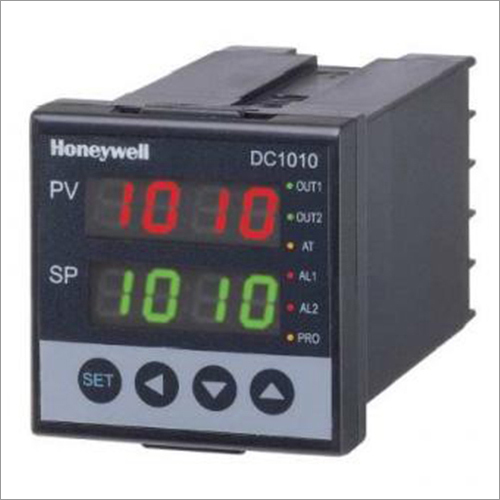
Tell us about your requirement

Price:
Quantity
Select Unit
- 50
- 100
- 200
- 250
- 500
- 1000+
Additional detail
Mobile number
Email

More Products in Honeywell PID Controllers Category
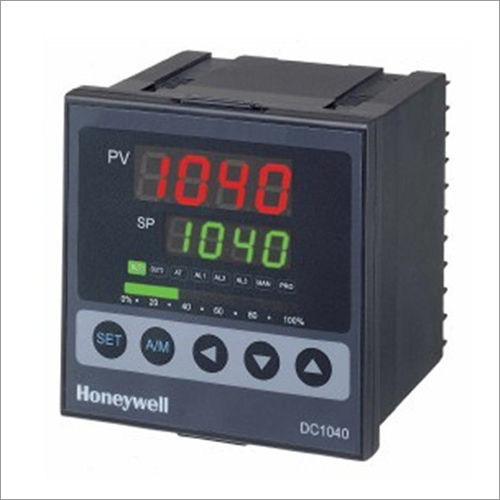
Honeywell PID Controller DC1040
Price 5000 INR / Piece
Minimum Order Quantity : 1 Piece
Dimension (L*W*H) : 96 x 96 x 110 mm
Design : Panel Mount
Usage : Industrial process control
Accuracy : 0.5% of full scale
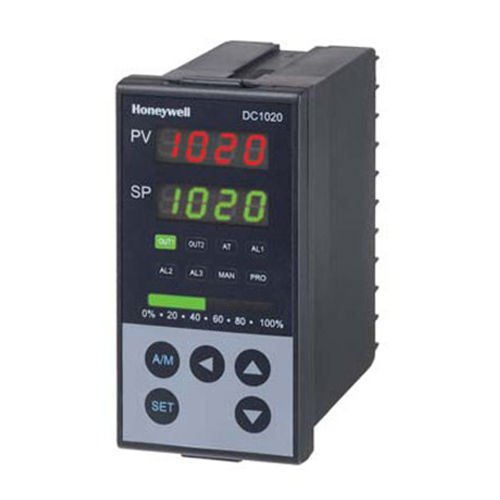
Honeywell PID Controller DC1020
Price 4000 INR / Piece
Minimum Order Quantity : 1 Piece
Dimension (L*W*H) : 48 48 110 mm
Design : Panel Mount
Usage : Industrial temperature/process control
Accuracy : 0.5% FS 1 digit
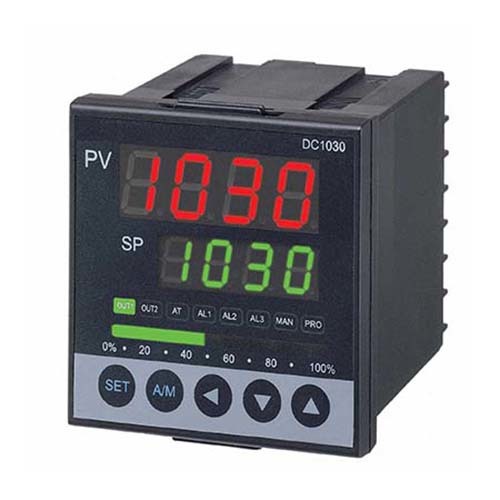
Honeywell PID Controller DC1030
Minimum Order Quantity : 1 Piece
Dimension (L*W*H) : 48 mm x 48 mm x 95 mm
Design : Compact DIN 1/16 size
Usage : Process Control
Accuracy : 0.5% of span


 Send Inquiry


Our Products
- Honeywell Gas Burner Controls
- Honeywell HVAC Controls
- Honeywell Paperless Recorders
- Honeywell Limit Switches
- Baumer Pressure & Temp Gauges
- Dwyer HVAC Sensors
- Honeywell Micro Switches
- Honeywell PID Controllers
- Honeywell Sensor IC Chips
- Greystone HVAC Sensors
- Thermodynamic Steam Traps
- Kavlico Pressure Transmitters
- City Technology Gas Sensors
- Honeywell Thermostat Switches
- Secure Energy Meter
- Honeywell Water Meter
- Honeywell Oil Flow Meter
- Honeywell Pressure Transmitter
- Honeywell Barcode Scanner
- Honeywell Safety Products
- Honeywell RFID System
- Honeywell Mobile Computer
- Honeywell Barcode Printer
- Honeywell Particle Sensor
- IP Converter
- Pneumatic Positioner
- Proximity Sensor
- Rotary Encoder
- Programmable PID Controllers
- Switch Mode Power Supply
- ABB Electromagnetic Products
- City Technology Sensors
- Secure Bi-Directional Meters
- Autonics Products
- Electromagnetic Flow Meter
- Fiber Optic Cable
- Optical Amplifiers
- Modular Tower Light
- Piezo Buzzer
- Photoelectric Sensors
- Digital Counters
- Hybrid Recorder
- Digital Paperless Recorder
- Vision Sensors
- Piston Valves
- Honeywell Torque Sensor
- IOT Gateway and IOT Devices
- Dew Point Sensors
- Thermal Transfer Ribbon
- Temperature Sensors
- Level Switch


232, Sunrise Mall, Near Swaminarayan Mandir, Judges Bungalow Road, Vastrapur, Ahmedabad - 380015, Gujarat, India

Mr Rajesh Garg
(CEO)
Mobile :08045477039
 Send Inquiry
 Send SMS
Developed and Managed by Infocom Network Private Limited.


 English
 Spanish
 French
 German
 Italian
 Chinese (Simplified)
 Japanese
 Korean
 Arabic
 Portuguese